Thanks for the tutorial. nice job thanks 

Thanks for the tutorial. nice job thanks
Hi all, i’m getting this error. pls help me
The table "{{user}}" for active record class "User" cannot be found in the database.
    After i removed braces, now it showing like this......


The table "user" for active record class "User" cannot be found in the database.Just wanted to add some tips on using exceptions that I’ve found very helpful while developing a REST API for internal use. The primary use case for interacting with the API is through Ajax requests - sending a POST or GET request and returning JSON - and I wanted a streamlined approach to handling and routing errors.
(Note: I get a lot of ideas from the folks at APIgee.)
These exception tips are also useful outside the API context as well for controlling application flow.
Custom CHttpException Base Class
I created a custom HttpException subclass that contains methods specifying the type of information I want available when presenting errors to developers or users, namely:
$message: The message for end users
$developer: the message for developers (more technical)
$statusCode: the relevant Http status code
$statusText: the relevant Http status text, e.g. "Forbidden" for 403
$infoUrl: a URL the developer can visit for more info about the error
$code: the internal classification code for the error
My most common use case for interacting with the API is through AJAX, in which case I usually specify done() and fail() handlers. This info usually contains all I need to easily relay specific information back to both end users and developers.
Common Sub-Classes
Http400Exception - For input/parameter errors
Http401Exception - for authentication errors
Http403Exception - for not-permitted errors
Http404Exception - when a specified resource is not found but the request is otherwise valid
Http500Exception - for unspecified internal errors
These provider shorthand access to the most common error types and enable me to subclass them for further customization (see below).
Model-Specific Exceptions
ValidationException - for when a model fails to validate (extends Http400Exception)
SaveException - for when an otherwise valid model fails to save to the database or execute a desired action (extends Http500Exception)
These special exceptions take a CModel instance in their constructor that references the model related to the error, allowing me to use the exception to determine what errors occurred, if any.
Example API Action
With these exceptions, my API Actions end up initializing a model, asking it to do things, and throwing exceptions whenever un-recoverable errors occur. It makes for little reduced visibility at first, but I like that 1) it’s clear once you dive in; 2) it’s easy to debug; and 3) it keeps all but presentation and routing logic out of the controller.
And after much trial and error, I find this easier and more maintainable than using exceptions in Models. I prefer having the controller ask the model to do stuff, see if it worked (true/false), handle that response, and then relay messages to the user (e.g. by asking the model for the errors that occurred).
public function actionUpdate($id, $suppress_status_code=false) {

	try {

		$model = MyModel::findByPk($id);

		if ($model===null)

			throw new Http404Exception("Model #{$id} was not found in the database");

		elseif (!authManager()->checkAccess('MyModel.update', user()->id, array('modelId' =>$id)))

			throw new Http403Exception("You are not authorized to update Model #{$id}");

		elseif (!isset($_POST['MyModel']))

			throw new Http400Exception("Your request could not be completed because we could not tell what attributes you wanted to update", 'Specify Model attributes using the $_POST["Model"]');

		else {

			$model->setAttributes($_POST['MyModel']);


			if (!$model->validate())

				throw new ValidationException($model);

			elseif (!$model->save(false))

				throw new SaveException($model);

			else {

				header("HTTP/1.0 200 OK");

				header('Content-type: text/json');

				echo CJSON::encode(array(

					"statusCode" =>200,

					"statusText" =>"OK",

					"message"    =>"Model #{$id} was successfully updated!",

					"developer"  =>null,

					"infoUrl"    =>null,

				));

				Yii::app()->end();

			}

		}

	} catch (HttpException $e) {

		$statusHeader = $suppress_status_code

			? "HTTP/1.0 200 OK"

			: "HTTP/1.0 {$e->statusCode} {$e->getStatusText()}";

		header($statusHeader);

		header('Content-type: text/json');

		echo $e->getJsonMessage();

		Yii::app()->end();

	}

}
i do it and in firefox extension all is good but in yii no  my call is:
$.ajax({

                url: 'url',

                type:'post',

                contentType: 'application/x-www-form-urlencoded',

                data: $("#product").val()

                });

            }
what is wrong? $_POST result empty but POST variable of firebug is correctly filled
tnx at all
Solved! my call is wrong, correction is:
data: 'prova='+$("#product").val(),
Tnx at all!! bye 
you can check you server .htaccess file, may there is configuration problem.
i used this tutorial, and really rocked !! thanks man !! 
Great tutorial. However, one huge problem for me. API inserts only null values. I believe I isolated the problem to the foreach() in the actionCreate() method (the only one I use).
        foreach ($_POST as $var => $value) {

            // Does the model have this attribute? If not raise an error

            if ($model->hasAttribute($var)) {

                $model->$var = $value;

            } else

                $this->_sendResponse(500,

                    sprintf('Parameter <b>%s</b> is not allowed for model <b>%s</b>', $var,

                        $_GET['model']));

        }
I know the JSON-encoded data is sent because I tested on a static web service. But, as this is my first attempt to use Yii, I have no idea how to debug this issue. I get no errors and I get an inserted record like this output in the callback:
{

   "user_id":"28",

   "last_visit":null,

   "first_visit":null,

   "locale":null,

   "this_visit":null,

   "latitude":null,

   "longitude":null,

   "device_maker":null,

   "device_model":null,

   "os_platform":null,

   "os_version":null,

   "opted_out":null,

   "opted_in":null,

   "modified":null,

   "model_type":null

}
How do I begin to debug this issue? Where can I set breakpoints so that I can inspect the $_POST global? Your attention and help is greatly appreciated.
hi all
thank you for this post
but what about comment
if i want to view post with its comment
how it should by
thank you very match
You have to be logged in to your application in order to make this work.
I followed this tutorial and it has worked quite well so far. I’m running into problems doing unit testing though. Lots of the methods make a call to
Yii::app()->end();
, which stops a unit test in its tracks.
Is there something I’m not doing right, or is it not possible to properly unit test when this call is done in the REST API methods?
if we create a new API Controller so I need to add the pattern in the URL Manager too something like this:
Controllers\ApiController.php

Controllers\NewApiController.php
in the URL Manager :
// REST patterns

array('api/list', 'pattern'=>'api/<model:\w+>', 'verb'=>'GET'),

array('api/view', 'pattern'=>'api/<model:\w+>/<id:\d+>', 'verb'=>'GET'),

//for new api controller

array('newapi/list', 'pattern'=>'newapi/<model:\w+>', 'verb'=>'GET'),

array('newapi/create', 'pattern'=>'newapi/<model:\w+>', 'verb'=>'POST'),
is that the right way here?
Sorry for my English.
Thank you for your Tutorial, i tried it and it was successfull.
Can you point me a right way how to create and read url for more complex queries, for example:
model ClientPayments
model Clients
what url will be for clientpayment by client with id and for certain date?
[solved] - going to learn regex
Hello everybody,
Trying to run this example I didn’t found the way to get success with it. I added the restclient addon on firefox and setted the parameters
Method: GET
URL: localhost/yiirest/index.php/api/posts
Headers (in menu Headers/Custom header)
X_ASCCPE_USERNAME: demo
X_ASCCPE_PASSWORD: demo
X_USERNAME: demo
X_PASSWORD: demo
Content-Type: application/x-www-form-urlencoded
Content-Type: application/json
private function _checkAuth()


{


    // Check if we have the USERNAME and PASSWORD HTTP headers set?


    if(!(isset($_SERVER['HTTP_X_'.self::APPLICATION_ID.'_USERNAME']))) {


        // Error: Unauthorized


        echo "not is set";


		exit;


		$this->_sendResponse(401);


    }


	else


	{


		echo "is set";


		exit;


	}
…
}
I tried a lot in many ways please help me.
But I am getting this response:
Status Code: 401 Unauthorized
Connection: Keep-Alive
Content-Length: 27
Content-Type: text/html
Date: Fri, 08 Jun 2012 01:10:22 GMT
Keep-Alive: timeout=5, max=100
Server: Apache/2.2.21 (Win32) mod_ssl/2.2.21 OpenSSL/1.0.0e PHP/5.3.8 mod_perl/2.0.4 Perl/v5.10.1
X-Powered-By: PHP/5.3.8
Just trying to figure out how works Rest API, any help it’s welcome.
Great tutorial have almost everything working. Like others I have som eproblems with the authentication, specifically I somehow am unable to set the user/pass headers. Any help/pointers would be much apreciated.
Here is what I have tried (based on what I’ve read in here!)
I have the following code:
Const APPLICATION_ID = 'AA';
protected function checkAuth() {

        // Check if we have the USERNAME and PASSWORD HTTP headers set?

        if(isset($_SERVER['HTTP_X_'.self::APPLICATION_ID.'_USERNAME'])){

            echo $_SERVER['HTTP_X_'.self::APPLICATION_ID.'_USERNAME'];

        } else {

         	echo 'Damn HTTP_X_' . self::APPLICATION_ID . '_USERNAME is not set';

        }

        if(!(isset($_SERVER['HTTP_X_'.self::APPLICATION_ID.'_USERNAME']) and isset($_SERVER['HTTP_X_'.self::APPLICATION_ID.'PASSWORD']))) {

            // Error: Unauthorized

            $this->sendResponse(401);

        }

        $username = $_SERVER['HTTP_X_'.self::APPLICATION_ID.'_USERNAME'];

        $password = $_SERVER['HTTP_X_'.self::APPLICATION_ID.'PASSWORD'];


        if($username != '' && $password != ''){

            return true;

            echo 'username and password not empty';

        } else {

            echo 'username and password empty';

            return false;

        }

        // Find the user (Removed until the above works)

    }
I have tried using Firefox with RESTClient set up with:
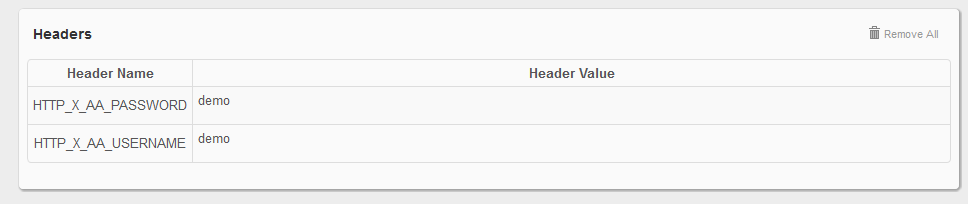
Header Name Header Value
HTTP_X_AA_PASSWORD demo
HTTP_X_AA_USERNAME demo
5953
with the following result:
Damn HTTP_X_AA_USERNAME is not set{"httpCode":401,"message":"Unauthorized"}
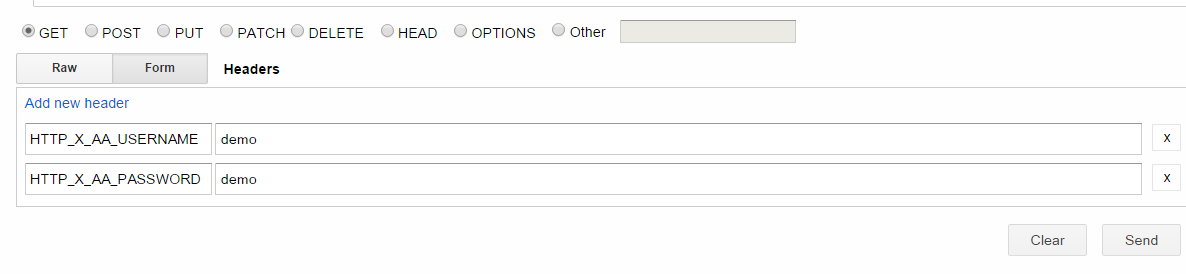
And "Advanced Rest Client" in Chrome set up the same way
Header: HTTP_X_AA_PASSWORD: demo
HTTP_X_AA_USERNAME: demo
5952
Result:
Damn HTTP_X_AA_USERNAME is not set{"httpCode":401,"message":"Unauthorized"}
So what am I missing in regards to setting the Header fileds??
Found the answer by accident! Headers were set correctly, just not read.
Turns out that when you run PHP as an Apache module (rather than as CGI) on windows, you won’t get all headers with $_SERVER. So in this case the desired Headers can be retrieved with apache_request_headers() .
solution ?
Hello guys,
Please help me out?
I have used the below link to create a REST API to connect with all models we have in present working site.
The code is working fine for POST model but when i am creating cases for other models like ‘User’ and ‘Comment’. So it throwing an error :-
<h1>Error</h1>Couldn’t create model <b>comments</b><ul><li>Attribute test: url</li><ul><li>Website is not a valid URL.</li></ul></ul>
One more question, did this API code work on mobile ?
Any help is greatly appreciated!
Thanks
Ranjita
Hello Sir,
I am using your tutorial, please guide me, why it is giving me error if i used this for others models.
-> I am running this appliation on Advanced Rest Client on crome.
-> this work grt for only post model.
-> not working for other models
-> I am adding the cases for other models in every function of API like
public function actionList()
{


    $this->_checkAuth();


    switch($_GET['model'])


    {


        case 'posts': // {{{


            $models = Post::model()->findAll();


            break; // }}}


        case 'comments': // {{{


            $models = Comment::model()->findAll();


            break; // }}}


        case 'users': // {{{


            $models = User::model()->findAll();


            break; // }}}


        default: // {{{


            $this->_sendResponse(501, sprintf('Error: Mode <b>list</b> is not implemented for model <b>%s</b>',$_GET['model']) );


            exit; // }}}


    }


    if(is_null($models)) {


        $this->_sendResponse(200, sprintf('No items where found for model <b>%s</b>', $_GET['model']) );


    } else {


        $rows = array();


        foreach($models as $model)


            $rows[] = $model->attributes;


        $this->_sendResponse(200, CJSON::encode($rows));


    }


}
Error Showing:-
500 Internal Server Error
<h1>Error</h1>Couldn’t create model <b>comments</b><ul><li>Attribute test: url</li><ul><li>Website is not a valid URL.</li></ul></ul>
Please help me, as you know better than me.
Thanks
Ranjita
I’m trying to find a way to create a CRUD app in Yii as a REST client.
Like using a "RestDataProvider" in index view;
create and update actions calling a REST url;
I can’t find a way of developing an interface in Yii to an external REST API.
May someone help me?
I’m Using this REST API