[EXTENSION] simpleWorkflow

I should have put these comments in here instead of the in the review.

Great extension and excellent documentation. Very timely for a project that I am working on that requires speakers to submit an abstract which then goes back and forth between editors and finally to a publisher.

One thing that was unexpected was the value placed in the field ‘status’ I expected it would be draft or edited or whatever but mine was (as if it was your post example), ‘swPost/draft’ and ‘swPost/edited’ is this the intended result?

Also a small bug in SWNode.php on line 115. PHP5.3 bails flagging keyword ‘split’ as deprecated. Change ‘split’ to ‘explode’ and everything is fine.

doodle

Hi doodle,

…and thanks for your feedback.Yes, what you’ve noticed is an expected behavior.

The fact is that the extension allows you to use more than one workflow for the same model, because in some cases it is more convinient to have 2 (or more) simple workflows than just a big one, full of transitions and hard to understand (or you can also share workflows among different models, which leads to the same consequences).Then it is required not only to know in which status a model is , but also in which workflow.

Another reason is that status names, only have to be unique inside a workflow, and not among all available workflows. For instance you may have defined an ‘edited’ status both for your ‘swPost’ and ‘swComment’ workflow. Again, this explains the ‘status’ column format.

I’m aware that documentation misses some explanations on specific points like this one, and I’ll improve it step by step (begining by adding a chapter to explain ‘status’ column format ;) )

I will also replace split by explode … but that"s for the next release.

thanks again for your comment

ciao

OK cool

I see the output from


<?php print_r(SWHelper::nextStatuslistData($model)); ?>

gives me


Array ( [swEventAbstract/draft] => draft* [swEventAbstract/correction] => correction ) 

is there a simple helper to turn ‘swEventAbstract/draft’ to output ‘draft’ I guess I could just explode the input string but do you have a method for that?

If not it might be a good one to add to the helper.

Take care, ;)

doodle

Currently there is no such helper, and as you may have guessed, SWHelper::nextStatusListData was written to help create an options list for a select box. In this context, if you choose to turn swEventAbstract/draft into ‘draft’ then you loose the workflow id part. This could cause a problem if for instance you are using more than one workflow.

Could you please tell me why you would need to remove the workflow part from the array heys ? I can’t think of a possible scenario, but my imagination has limits ;)

ciao

Sure, lets say my speaker submits a proposal for a lecture. The initial submission is a draft. Then an editor looks at it and say’s great this is good enough to use and flags it as acceptable. The next step would be the publisher who has a final say.

The original author (speaker) could log in to the account and see the current status of the proposal, is it accepted, rejected, requires editing etc.

I think the logic for keeping unique states is very valuable but on the output end we need something more like common language.

So if the speaker sees ‘accepted’ it will make much more sense than ‘swEventAbstract/accepted’.

Make sense, just a simple tool for views.

Take care,

doodle ;)

Well…

Since the nextStatusListData helper function returns a list of options using the labels, why not offer a helper to display the status using the label?

If your imagination is depleted, here’s a picture to jog it:

855

imagination.png

When you define your workflow, you must set an id for each status (like you did) but you can also set a Label. The label is nothing but a user friendly name for the status. It doesn’t have to be unique or anything, and can handle internationalization.

When you use the SWHelper::nextStatusListData method, what it does is populate an array with key/value pairs, where keys are the status Id and value the status label. If not label is defined, then the Id is used (that what happened in your case).

Here is an example :


<?php	

	return array(

		'initial' => 'draft',

		'node' => array(

			array('id'=>'draft' ,

	  			'label' => Yii::t('draft')	// I8N status label

	  			'transition'=>'correction'),

			array('id'=>'ready',

	  			'label' => 'Ready for publication' 	// 'regular' string label

	  			'transition'=>'draft,correction,published'),

			array('id'=>'correction','transition'=>'draft,ready'),

			array('id'=>'published', 'transition'=>'ready,archived'),

			array('id'=>'archived', 	'transition'=>'ready'),

		)

	)

?>

As you can see, status draft has a ‘label’ key set to ‘Yii::t(‘draft’)’, so it uses Yii internationalization feature to display the status name to the user. The ready status has a simple string has label (‘Ready For Publication’), and eventually all other statuses don’t have any label key, so they will automatically be displayed as <workflowId>/<statusId>.

I hope this will help solve your problem.

ciao

Hi Jacmoe,

if you want to display a status label you can write something like :


echo $model->swGetStatus()->getLabel();


The swGetStatus() method returns a SWNode object. You can check the API reference here

ciao

Thanks a lot, it works! :lol:

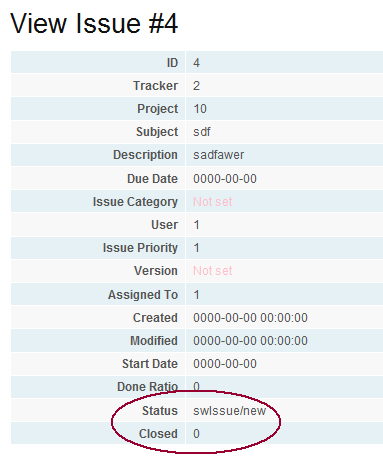
Here’s how to use it in a zii.widgets.CDetailView:


<?php $this->widget('zii.widgets.CDetailView', array(

	'data'=>$model,

	'attributes'=>array(

		'id',

		'tracker_id',

		'project_id',

		'subject',

		'description',

		'due_date',

		'issue_category_id',

		'user_id',

		'issue_priority_id',

		'version_id',

		'assigned_to',

		'created',

		'modified',

		'start_date',

		'done_ratio',

		array(

                	'label' => 'Status',

                	'type' => 'raw',

                	'value' => $model->swGetStatus()->getLabel()

            	),

		'closed',

	),

)); ?>

I am a Yii newbie, so tell me if there’s an easier way.

But ‘Status’ is now rendered by it’s label ‘New’. Perfect.

Thanks for a excellent extension. :)

Good to hear ! … and what you wrote is just fine…

ciao

This is excellent, thank you so much Raoul.

Great extension and nicely documented.

doodle

First I have to say this extension could really save me a lot of work so thanks for this ;)

Second one thing which I find strange. If I have a Workflow like in the Blog Demo with a constraint like:


array('id'=>'ready',

	'constraint' => '!empty($this->tags)',

	'transition'=>'draft,correction,published'),


I would think that I could select those status if this state is currently is in correction even if the tags are not filled. And will get an error that the tags are not filled in the model validation.

Currently if some Author enters a text and fill only the title and the content because they are required and saves this as ‘draft’. Than the post status of this post will be set to ‘correction’ if editing is finished so the next state would be ‘ready’. But when you open the post entry for edit you will only see draft and correction as possible states because the Tags are not filled. Only when you enter some tags save and open the post again you will see the ready option available to select.

I would recommend that you will see all states which are possible from the current state in the dropdown. But would then get an error on model validate that the constraint isn’t fulfilled if he selects the state ready.

Otherwise he also wouldn’t know what fields he must fill to even see that ready state.

Hi Horizons,

if I understand well, you’d like that constraint evaluation occurs at the time the status changes (during model validation), and not when retrieving possible next status list. If that is so, then I must say that you are right ! One solution would be to add an argument so to the SWHelper::nextStatusListData method.

Something like :


SWHelper::nextStatusListData($model, $includeCurrentStatus=true, $evaluateConstraint=true);

What do you think ?

I could include it in the next release (that is, when I’m back from holidays ;) )

ciao

Something like this or and display_all setting for the helper to display all status possibilities from the current state without the constraint evaluation.

The only Problem would be that the error would just display "not a valid next status" for the status dropdown.

And wouldn’t make a hint that the tags failed (blog demo).

I guess the best thing would be that you would change the code that the validators themself could be added.

like an array


 array('id'=>'ready',

    'constraints' => array(

            array('tags', 'required'),

    ),

   'transition'=>'draft,correction,published'),

 ),


And the validation would be done as if it was done on the model itself and would display the error on the correct attribute (e.g here tags). But this validation for those attributes would only be checked on certain states.

Hmm would be similar to the ‘on’=>array(‘ready’) setting on the rules for the scenario’s.

Maybe this could be combined like that the SWActiveRecordBehavior searches for the rules with the same transition names in the ON setting (e.g. swPost/ready) an validates them when this state is set.

Or just set the model on that scenario ‘ready’ in the validation process and back to ‘correction’ if validation failed (don’t know if that is a good idea).

Yes, I’ve also been thinking about how validators and/or scenario could be used to manage constraints…

For me, validators and status constraints are 2 different things and one should take care not to move validation process, from the model to the workflow. For your example, i agree that it would make sense to postpone constraint evaluation at the time the model is validated, but this may not be appropriate in other case. Imagine that a given state is only reachable if user have sufficient permissions. It is clear that the list of reachable statuses should not contain statuses that can’t be reached because of insufficient user permission, and so constraint evaluation would have to occur before the list is built.

But tell me, from a conceptual point of view, shouldn’t the ‘tag not empty’ rule be actually a part of the model validation ? I mean I know that’s the example I used to illustrate constraints in the documentation, but maybe that"s not the best idea I’ve had, because by doing so, I’m moving a small part of validation, from the model into the workflow … which I think is not good.

Guess you are right. It was just your example which was not really the best to choose ;)

If there should be a validation for the tags to be filled you just have to add a rule for it.


public function tags_check($attribute,$params)

    {

        if($this->status=='swPost/ready'||$this->status=='swPost/published')

        {

           if(!$this->tags)

              $this->addError('tags','The Tags must filled for the selected status');

        }

    }

and to the rules   

  array('tags', 'tags_check'),


This would be then checked if the post will be set to ready or published. So if your constraint is only used for access handling you are right.

Nevertheless a validation from and to specific states would be also nice.

I will play around with the extension and reply here if i find some enhancement possibilities.

ok then … and regarding validation based on status change that will need some more thinking (maybe scenario could be the way).

I’ll be grateful for any enhancements, ideas, or anything that could contribute to make this extension better… and I’ll update the documentation as soon as possible (that is, when I’m back from holidays ;) )

thanks for your help

8)

[size="2"]simpleWorkflow RC2 is available[/size]

The main feature is workflow driven validation that allows to validate a model on a workflow transition. You can now implement validation rules like "I want this attribute to be required when the model instance goes from statusA to statusB", or even something more general like "I want this attribute to be validated when the model enters in statusC"… Ok, have a look at the documentation for more details and examples.

I hope it will be useful to others, and like always : any feedback is welcome ;)

Direct Download : simpleWorkflow_RC2.zip

Ressources :

  • Extension Page
  • Demo & website
  • API Documentation

ChangeLog :

  • fix : replace ‘split’ with ‘explode’ (got 2 doodle)
  • enh : SWActiveRecordBehavior->swValidate now returns boolean
  • enh : Workflow Driven Model Validation. It is now possible to define validators which are only executed upon specific transitions (this is done by defining specific scenario names).

Really cool extension! :D

I am a happy consumer. ;)

I’m hoping someone can help me here because my brain is about to explode!

I am using the simpleWorkflow validator in my model. It’s a great extension, thank you so much Raoul.

I have a scenario with contributors, reviewers, a master editor a publisher etc.

In order to provide unique workflows for each role I set up my swSource file with a switch/case construct - example.


$level = MyUtils::userLevel();

	switch($level) 

	{

	case User::CONTRIBUTOR_USER:


		$statusArray = array(

		'initial' => 'draft',

		'node' => array(

			array('id'=>'draft',	 'transition'=>array(

                            'submitted'=>'MyUtils::contributorMail($this->id,0)'

                            )

                            ),// CONTRIBUTOR

			array('id'=>'revise', 'transition'=>array(

                            'submitted'=>'MyUtils::contributorMail($this->id,1)',

                            'withdrawn'=>'MyUtils::contributorMail($this->id,2)'

                            )

                            ),// CONTRIBUTOR

			array('id'=>'withdrawn'),// CONTRIBUTOR

            array('id'=>'submitted'), // editor or contibuter

			array('id'=>'rejected'), // CONTRIBUTOR

			array('id'=>'accepted'), // publisher

                        array('id'=>'on-hold'), // publisher

			array('id'=>'scheduled')	// end of the line for all users									

		)

	);

	break;

	case User::REVIEWER_USER:

		$statusArray = array(

		'initial' => 'draft',

		'node' => array(

			array('id'=>'draft'), // CONTRIBUTOR

			array('id'=>'revise'),// CONTRIBUTOR

			array('id'=>'withdrawn'), // CONTRIBUTOR

			array('id'=>'submitted',

                            'transition'=>array(

                            'accepted'=>'MyUtils::reviewerMail($this->id,1)',

                            'revise'=>'MyUtils::reviewerMail($this->id,0)',

                            )), // editor or contibuter

			array('id'=>'rejected'), // CONTRIBUTOR

			array('id'=>'accepted'), // publisher

                        array('id'=>'on-hold'), // publisher

			array('id'=>'scheduled') // end of the line for all users

		)

	);

	break;

So each user role has options based on their role, I am not sure if this is best practice but at least this part is working.

I am also able to send an email using a method in a component called ‘MyUtils’, I simply pass the document ID and the mode or function.

All is working well, except it seems sometimes a reviewer will be a contributor and sometimes a master editor will be a contributor.

Contributor should be the only one who can pass his own ‘draft’ document to ‘submitted’.

Within this workflow source document I do not seem to be able to establish what the ID of the document is. I can do a down and dirty $_GET[‘id’] because on an update I have this is the URL but then I have to check if $_GET[‘id’] is set and it’s just not working. I also tried setting an constraint but that didn’t seem to work.

I don’t quite understand how the swSource document works but it seems to be like a configuration file that is loaded when required so I don’t think that the document (record) id is available at this time.

Next I am going to try a constraint again. Using something like.


array('id'=>'draft',

'constraint'=>'MyUtils::isOwner($this->id)',	 

'transition'=>array(

                   'submitted'=>'MyUtils::contributorMail($this->id,0)'

                            )

                            ),


Any help or advice would be much appreciated.

I am using the original version of this extension, should I upgrade?

doodle ???