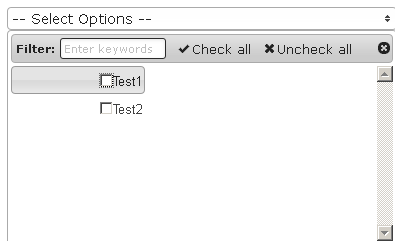
Just wanted to let you know that following the instructions on the Extension download page, I had to add the ‘EchMultiSelect.EchMultiSelect’, as the instructions are a bit ambiguous there.
Also, with this standard installation instruction, am getting only a list without any errors/style or headings. Will see into this after, but right now is what I have.
EDIT: Found the problem on the ‘name’ attribute. Just removed it. This can be clarified on the installing instructions.
Hi, I’m a newbie and came across this widget, which I think is great - thanks very much for putting this together. However, I don’t fully understand how to properly POST to my database table. For example, if I have 10 items and the first three are checked, firebug shows me something like this:
ModelName[field][] 1
ModelName[field][] 2
ModelName[field][] 3
But if "field" is only one column in the table, how are 3 different values being POSTed to it? Is DropDownAttribute supposed to be an array, not a variable?
Also, what if I had a table set up with id, field_1, field_2, field_3, field_4, etc. Each field_X entry will be either "0" (if no posting) or "1" if that item was checked. How can I achieve that with this widget?
you define a new attribute/variable in the model file, at the beggining, directly after the class starts:
class Car extends CActiveRecord {

   $colors = array();

   ...

}
The name of the variable should not be equal to a column name. Here, your model/table should not have a column named ‘colors’. You then use this new attribute in the widget:
that provides the id’s of the clicked/selected colors for further use.
To handle the field_1,…,field_N columns:
You could build an array, like
$data = array('field_1',...,'field_N');
and use it as the data source in the widget above.
Then in the controller you can loop from 1 to N and check for each, if the correspondig box was selected and set the field_X accordingly. Something like:
Otherwise, you would have to provide a separate checkbox for each of the field_X columns in your form. And to combine a set of checkboxes into a dropdown of checkboxes, I think we would need a different widget.
When you use the relation name as the dropDownAttribute, that is not enough to make the dropDownList know which elements should be preselected. That’s because dropDownList needs an array of elements/values, not an array of objects.
If ‘categories’ is a relation in the model Post for example, then:
$model = Post::model()->findByPk($id);

$pcs = $model->categories; // This is an array of objects. Not a array of values.
returns an array of objects, which cannot be utilized by dropDownList.
After that, ‘$model->categories’ is an array of ids/values, that dropDownList can utilize, and the values will be preselected.
Note that after clicking ‘update’ in the form, the newly selected values will not be automatically saved in the relation table PostCategories. You have to take care of it in your actionUpdate() method of your Post model.
I recommend this article: Handling Related Models in Yii Forms from Larry Ullman.
This was actually my next question - what if I want to do it simpler (without relations)? I currently have in my model:
        public static $TypeArray

          = array(

                 1=>'TYPE1',

                 2=>'TYPE2',

                 3=>'TYPE3',

                 4=>'TYPE4',

                 5=>'TYPE5',);
and my view file has
                $types = Model::$TypeArray;

                $this->widget('ext.widgets.EchMultiselect', array(

                'model'=>$TypeModel,

                'dropDownAttribute'=>'type',  //I did as you said and created new array $type in controller

                'data'=>$types,
And my table has field_1, field_2, field_3, field_4, field_5, each which gets set to 0 or 1 depending on whether they get checked (working thanks to your code suggestion!).
So how do I get it to now show the already checked values after POST? Thanks so much.
This way, you fill the new variable/array type of your model according to the values in your table, before your render the form.
Since the widget in your view file has type as its dropDownAttribute, and type is an array with values, the widget will/can use these values to preselect the options.
This makes sense - I am running into an error though with $TypeModel->field_$i - my editor is saying that doesn’t work (the field_$i). I tried it with field_.$i but that doesn’t work either. Any thoughts?
// To get the value of the model-attribute

$fieldname = 'field_'.$i;

$type[$i] = $TypeModel->attributes[$fieldname];


// And if you want to set the value of the model-attribute at some point:

$TypeModel->setAttribute($fieldname, $tpye[$i]);
Great, this worked perfect. I ended up using something like this:
for($i=1;$i<=5; $i++) {

$fieldName = 'field_'.$i;

if ($TypeModel->$fieldName == 1) //check model for 1 or 0

 $TypeModel->type[$i] = $i;  //using $i instead of 1 since we need checkbox value, but model only stores 0 or 1

    else $TypeModel->type[$i] = 0;
Again, really appreciate your help and instruction!
I tested it but I can’t get the options take the whole width of the widget. They are left-aligned (about on the 100 first px I think) even if I increase the width of the widget.
I assume that the same problem exists when you define the width via ‘width:450px’ instead of span-10?
It seems to me, that there are other style-declarations (like width, or float:right etc.) that affect the checkboxes and make them appear that way…
Do you use Firebug (the add-on for firefox)?
With firebug you could determine what styles exactly are applied to the checkboxes.
Sometime css-styles do behave unexpectedly and if there are more than one css-file, something overrides the other and there is no way to know what happpens without some tool like firebug…